Reports give you the data behind your pricing, whether you use tgndata for price monitoring, dynamic pricing or MAP monitoring.
Click Reports in the left sidebar to find all your reports.
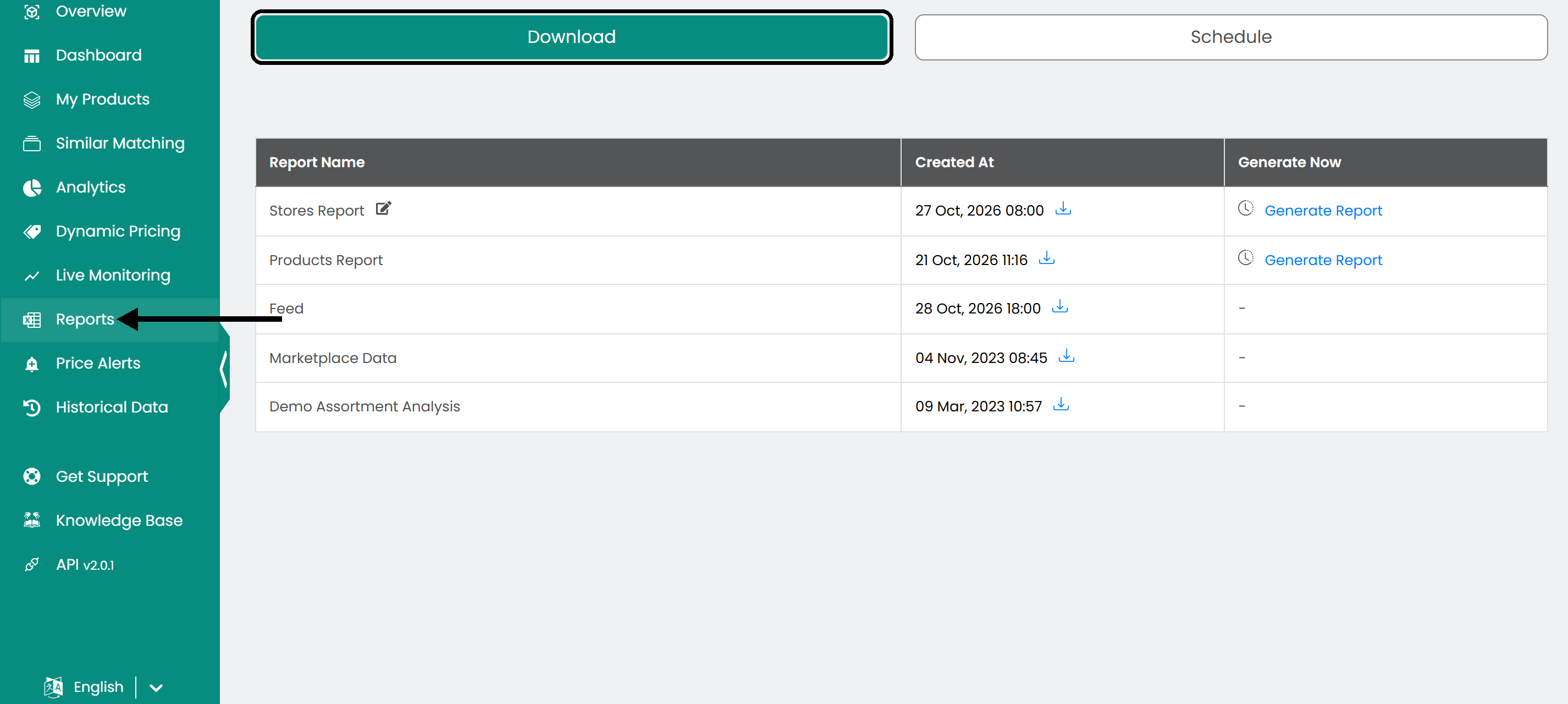
Generate a report
Click Generate Report in the right column of the table to create a report when you need it.

Note: You can generate a report on demand only for the Stores and Products reports. After generating a report, you can generate it again after 10 minutes.
Download a report
Click the download button to save a report to your computer. The date shown also tells you when the report was last created.

Prebuilt reports
Stores report
Compares prices, availability and shipping costs for your products in the shops you select.
| Column | Meaning |
|---|---|
| Top Category, Mid Category, Bot Category | The categories of the product, from broadest to narrowest. |
| Brand | The product's brand. |
| SKU | The product's unique identifier. |
| Product Name | The product's name. |
| My Price | Your current listing price. |
| Competitive prices | One column per platform, for example Google Shopping or TradeInn. |
| Percentage Difference | The difference between your price and the competitor's price, in percent. |
| Diff Value | The difference between your price and the competitor's price, as an amount. |
| Availability | Whether the product is available on each platform. |
| Shipping Costs | The shipping cost on each platform. |
Products report
Compares your products across e-commerce platforms: prices, competitors and availability.
| Column | Meaning |
|---|---|
| Top Category, Mid Category, Bot Category | The categories of the product, from broadest to narrowest. |
| Brand | The product's brand. |
| SKU | The product's unique identifier. |
| Product Name | The product's name. |
| My Price | Your current listing price. |
| Cheaper Price | The lowest price for the same product on other platforms. |
| Diff % | The percentage difference between your price and the cheapest competitor price. |
| Diff Value | The difference between your price and the cheapest competitor's price, as an amount. |
| Cheaper Name | The competitor that offers the product at the lower price. |
| Price Indexes (for example Price.23) | One column per platform with the price shown there. |
| Diff Perc. | The percentage difference between your price and the competitor's price on each platform. |
| Availability | Whether the product is available on each platform. |
| Shipping Costs | The shipping cost on each platform. |
Feed report
Compares your product prices with your competitors' prices for identical products, including availability and shipping costs.
| Column | Meaning |
|---|---|
| Top Category, Mid Category, Bot Category | The categories of the product, from broadest to narrowest. |
| Product Name | The product's name as listed. |
| SKU | The product's Stock Keeping Unit. |
| Brand | The product's brand. |
| Competitor Name | The competitor that sells the product. |
| Price | The competitor's listed price. |
| Availability | Whether the product is available on the competitor's platform. |
| Shipping Costs | The shipping cost of the competitor's offer. |
| Product URL | A link to the product page on the competitor's website. |
Marketplace report
Shows your product listings across marketplaces: prices, availability and your position.
Note: The Marketplace report is only available when you monitor one of the available marketplaces.
| Column | Meaning |
|---|---|
| Top Category, Mid Category, Bot Category | The categories of the product, from broadest to narrowest. |
| EAN | The European Article Number of the product. |
| SKU | The Stock Keeping Unit used for internal tracking. |
| Product Name | The product's name. |
| My Price | The price at which you offer the product. |
| Product Price | The price listed on the marketplace by competitors. |
| Price Percentage Difference | The difference between your price and the marketplace price, in percent. |
| Price Value Difference | The difference between your price and the competitor's price, as an amount. |
| Availability | Whether the product is available on the marketplace. |
| Store Name | The store or seller that offers the product. |
| Marketplace Name | The marketplace where the product is listed. |
| Ranking | The ranking of your product on the marketplace. |
| Shipping Cost | The shipping cost of the product. |
| Total Price | The product price plus shipping: the total the customer pays. |
| Product URL | A link to the product page on the marketplace. |
Assortment Analysis report
Compares the product offerings of several competitors: prices, availability, categories and shipping costs.
Note: The Assortment Analysis report is part of the assortment add-on, which is a separate service.
| Column | Meaning |
|---|---|
| Competitor Name | The competitor that offers the product. |
| Product URL | A link to the product page on the competitor's website. |
| Product SKU | The Stock Keeping Unit the competitor uses for internal tracking. |
| Product Name | The product's name as listed by the competitor. |
| Product Price | The price at which the competitor offers the product. |
| Sales Indicator (0/1) | Whether the product is currently on sale: 1 for yes, 0 for no. |
| Top Category, Mid Category, Bot Category | The product's categories in the competitor's catalog. |
| Product Brand | The product's brand. |
| Product Availability | The availability status of the product on the competitor's site. |
| Product Shipping Cost | The shipping cost of the product. |
| GTIN | The Global Trade Item Number: a unique identifier that matches products across competitors. |
Was this article helpful?
That’s Great!
Thank you for your feedback
Sorry! We couldn't be helpful
Thank you for your feedback
Feedback sent
We appreciate your effort and will try to fix the article